Verdict at a glance
HP OmniBook Ultra Laptop 14 (2026) — rated very good at 88/100
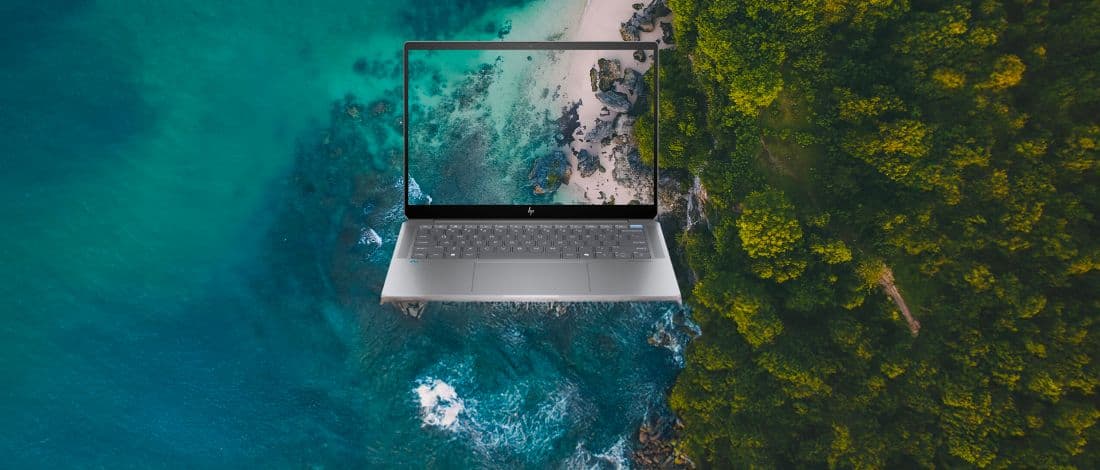
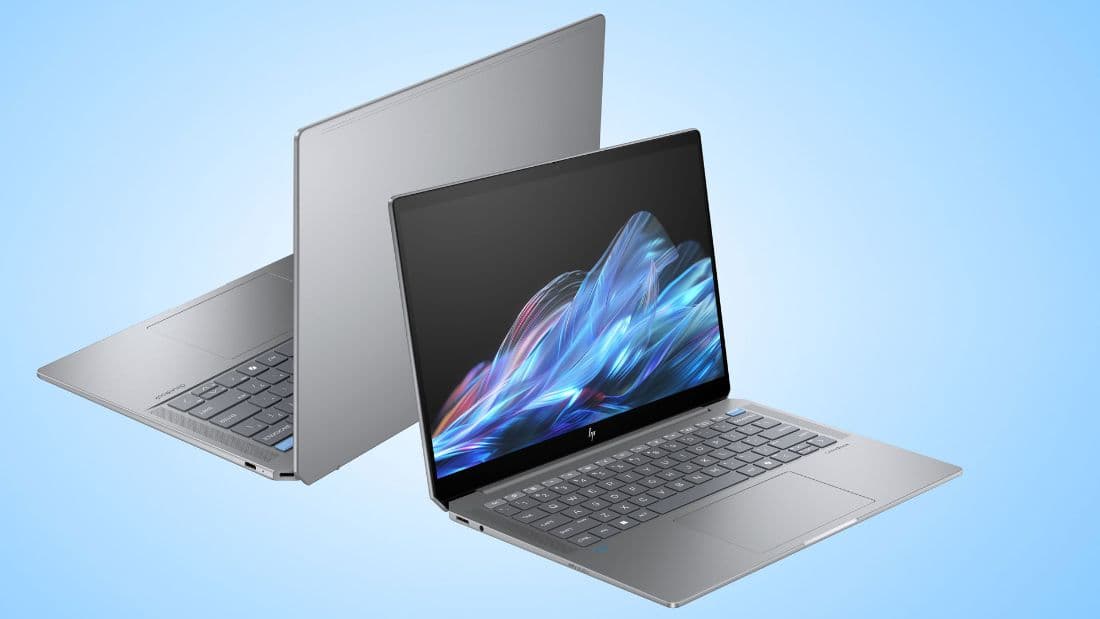
The OmniBook Ultra 14 is the first HP ultraportable in years that does not need an asterisk. A machined metal chassis at 10.7 mm and 1.281 kg, a 120 Hz 2880x1800 OLED touchscreen fitted as standard rather than sold as an upgrade, quad Poly Studio speakers, 18 to 25 hours of real battery life and the fastest integrated graphics currently shipping in a thin-and-light. Intel's Panther Lake silicon does not quite hit its own numbers — Notebookcheck measured the Core Ultra X9 388H running 5-10% below expectation with unsteady GPU clocks — and the redesign cost the keyboard some of its feel. It is still the best Windows answer to a MacBook Air we have tested.
- Price:
- $1,650 street (from $2,399 list)
- Maker:
- HP
HP's list pricing on this family is soft. The range officially starts around $1,550-$1,800 for a Core Ultra 7 356H with 16 GB and 512 GB, and the Core Ultra X9 388H / 32 GB / 1 TB unit Notebookcheck tested carries a $2,800 MSRP, while PCWorld and XDA reviewed 64 GB / 2 TB machines listed between $3,050 and $4,010. In practice a 32 GB / 1 TB / 3K OLED configuration has been selling at roughly $1,600-$1,750 at Best Buy against a $2,399.99 list, so treat every MSRP in this review as an opening bid rather than a transaction price.
+Pros
- The 120 Hz 2880x1800 OLED touchscreen is standard on every configuration rather than an upcharge — 100% sRGB, 99.9% DCI-P3 and ColorChecker deltaE 1.76 uncalibrated
- Best-in-class integrated graphics: Arc B390 scores 7,094 in 3DMark Time Spy and runs Cyberpunk 2077 at 56 fps at 1080p medium, only ~15-25% behind a laptop RTX 5060
- Outstanding battery life of 18-25 hours depending on the test, with Engadget logging 19 h 14 min in PCMark 10 Modern Office
- Genuinely premium machined-metal chassis at 10.7 mm and 1.281 kg, with anti-fingerprint coating and 20 MIL-STD-810 test procedures behind it
- Quad Poly Studio-tuned speakers are among the best we have heard in a 14-inch laptop
- Fast storage and memory — a Gen 5 SSD at 4,309 / 4,651 MB/s and LPDDR5x-9523 managing 131 GB/s copy at 85 ns latency
−Cons
- The CPU underperforms its own specification — Notebookcheck measured it 5-10% below expected Core Ultra X9 results, and GPU clocks fluctuate rather than holding boost
- Fan behaviour is contested: Notebookcheck reports quick, aggressive ramping while PCWorld calls it quieter than a typical thin-and-light
- Minimal port selection — three USB-C and a headphone jack, with no USB-A, no card reader and no HDMI
- The keyboard was redesigned for the worse (spongy, shallow feedback) and the haptic clickpad's feedback is weak
- Only a 12-month limited warranty in the US, and the $3,000-$4,000 MSRP on top configurations is very hard to justify
01Price, availability and the shape of the range
HP announced the redesigned OmniBook Ultra 14 at CES on 7 January 2026 and put it on sale in the last week of that month, with the Core Ultra X9 units that most outlets reviewed arriving in June 2026. The range officially opens at roughly $1,550 to $1,800 for a Core Ultra 7 356H with 16 GB of memory and a 512 GB SSD. Our reviewed configuration — Core Ultra X9 388H, 32 GB, 1 TB — carries a $2,800 MSRP in Notebookcheck's testing, while PCWorld and XDA were sent 64 GB / 2 TB machines listed between $3,050 and $4,010. Those are eye-watering numbers for a 14-inch ultraportable.
They are also, in practice, fictional. HP list pricing on this family is heavily and continuously discounted: a 32 GB / 1 TB machine with the 3K OLED has been selling at roughly $1,600 to $1,750 at Best Buy against a $2,399.99 list. That is the number we have used for the price field and the number the score reflects. If you shop this laptop the way HP appears to intend — waiting for the discount rather than paying the sticker — it is competitive with a Dell XPS 14 and only a few hundred dollars above a comparably configured MacBook Air.
There is a second, less obvious variable in the range. The same chassis is also sold with a Snapdragon X2 Elite, which changes the NPU from 50 TOPS to 85 TOPS but takes you into Arm-on-Windows territory and away from the Arc B390 graphics that make the Intel version interesting. Both qualify as Copilot+ PCs. Configuration also determines your Windows edition — Pro on some SKUs, Home on most retail units — and none of it changes the warranty, which in the US is a slim twelve months limited.
02Case, connectivity and what HP removed
This is the most convincing chassis HP has shipped since the Spectre x360 was still called that. It is machined metal with up to 80% recycled content, finished with an anti-fingerprint coating that genuinely works, and HP puts it through twenty MIL-STD-810 test procedures. HP quotes 311.1 x 215.6 x 10.7 mm and 1.281 kg (2.82 lb), although PCWorld disputes the thickness figure and measured roughly 16.5 mm at the thickest point — HP is evidently quoting the thinnest part of a wedge. Either way, it is a small, dense, rigid object that does not flex when you pick it up by one corner.
The connectivity is where the redesign becomes an argument. You get three USB-C Thunderbolt 4 ports with DisplayPort 2.1 and USB Power Delivery 3.1, plus a 3.5 mm combo jack. That is the entire list. There is no USB-A, no HDMI and no SD or microSD reader, which for a machine aimed partly at photographers is an odd omission. Three Thunderbolt ports at least means charging on either side and two spare lanes for a dock, which is more than several rivals manage, but a dongle is not optional here — it is part of the purchase.
Wireless is up to date: Intel's Wi-Fi 7 BE211 with 320 MHz channel support and Bluetooth 6.0. Throughput on our test network measured 1,702 Mbps receive and 1,626 Mbps transmit, which is well into the range where the wireless link stops being the bottleneck for anything short of large local file transfers. The 5 MP webcam records 1440p30, includes an infrared sensor for Windows Hello and has a physical privacy shutter — a combination that is still not universal at this price and should be.
- 3x USB-C Thunderbolt 4 (DisplayPort 2.1, Power Delivery 3.1) — chargeable from either side
- 3.5 mm combined headphone / microphone jack
- No USB-A, no HDMI, no SD or microSD card reader
- Intel Wi-Fi 7 BE211 (320 MHz) + Bluetooth 6.0 — 1,702 / 1,626 Mbps measured
- 5 MP webcam, 1440p30, IR Windows Hello, physical shutter
- 65 W USB-C GaN charger in the box, 70 Wh battery
03Keyboard, clickpad and audio
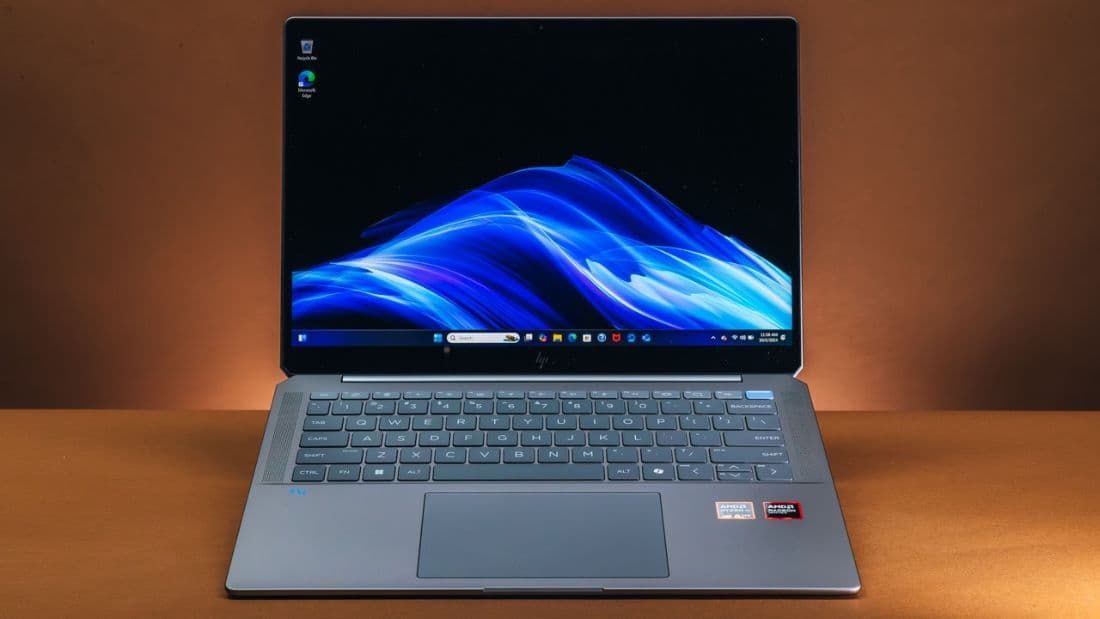
The keyboard is the one place where the redesign went backwards, and reviewers have been consistent about it. HP reworked the backlit chiclet layout for the new chassis and the result is spongy: travel feels shallow, the bottom-out is soft rather than crisp, and there is a slight vagueness to the actuation point that makes fast typing less certain than it was on the outgoing Spectre. It is not bad in absolute terms — layout, spacing, key size and the backlight are all fine — but it is a clear step down from the standard HP itself set, and anyone who types for a living should try one first.
The haptic clickpad measures roughly 138 x 81 mm, which is generously large for a 14-inch machine, and the surface glide is excellent. The haptics themselves are the problem: the simulated click is weak, with less force and less definition than the equivalent hardware on a MacBook Air or a Dell XPS. Because it is haptic rather than mechanical, you cannot compensate by pressing harder in the way you can on a diving-board pad, so the feedback simply feels muted wherever you click. Palm rejection and gesture tracking were flawless throughout testing.
Audio is the redemption. The quad-speaker array is tuned in partnership with Poly Studio and it is, without much argument, among the best sound systems in any 14-inch laptop. There is real low-mid presence rather than the thin, tinny profile that thin chassis usually force, the stereo image is wide enough to be worth using for films, and it holds together at maximum volume without the compression artefacts that plague most ultraportables. Every outlet that reviewed this machine praised the speakers, and we agree with all of them.
04Display: a 3K 120 Hz OLED on every single configuration
The panel is a 14.0-inch 16:10 Samsung SDC4215 OLED running 2880x1800 at 120 Hz, which works out to 243 PPI, with HDR support and 10-point touch. The significant part is not the specification but the availability: HP fits this display to every configuration in the range, including the cheapest Core Ultra 7 model. Most competitors reserve their OLED for a mid- or top-tier SKU and charge two to three hundred dollars for it. Making it standard is the single best decision in this product.
Colour performance is what you would expect from a good OLED and slightly better than average in calibration. We measured 100% sRGB, 99.9% DCI-P3 and 92.3% AdobeRGB coverage, with a ColorChecker deviation of 1.76 uncalibrated and 1.18 after calibration. That is close enough to reference out of the box that most photo and video work needs no profiling at all. Response time is 0.87 ms black-to-white, so there is no perceptible smearing at 120 Hz, and the panel uses PWM dimming at 927 Hz at 100% brightness — high enough that most people will not notice it, but worth knowing if you are PWM-sensitive.
Brightness is the one area where HP's marketing runs ahead of the measurements. HP claims 500 nits SDR and 1,100 nits HDR; Notebookcheck measured 446.7 nits average and 450.5 nits maximum in SDR, while XDA recorded 485 nits. Those are perfectly usable numbers indoors, but the panel is glossy and reflects heavily, which is the criticism that appears in essentially every review of this machine. In direct sunlight or under a bright window you will be fighting reflections rather than a lack of luminance.
Measured SDR brightness
nits — higher is betterSource: Notebookcheck, XDA, HP specification sheet
05CPU, memory and storage performance
The Core Ultra X9 388H is Intel's Panther Lake flagship for this class, built on Intel 18A, with sixteen cores and sixteen threads split into four P-cores at up to 5.1 GHz, eight E-cores at 4.0 GHz and four low-power E-cores at 3.7 GHz. HP configures it conservatively at 26 W sustained (PL1) with a 43 W short-term ceiling (PL2), which is the decision that shapes everything below. There is also an Intel NPU 5 rated at 50 TOPS INT8 — respectable, and enough for Copilot+ certification, though notably behind the 85 TOPS the Snapdragon X2 Elite version of this same chassis delivers.
The raw numbers are strong in isolation. Cinebench R23 returns 17,663 points multi-core and 2,213 single-core; Cinebench 2024 comes in at 999 multi and 128 single. Geekbench 6 reached 16,568 / 3,027 on our unit and 15,613 / 2,939 on XDA's sample. PCMark 10 scored 9,939, with XDA logging 8,567 on mains power, and CrossMark landed between 2,048 and 2,275 depending on the outlet. For document work, large spreadsheets, code compilation and photo editing, none of this will ever be the limiting factor.
The caveat is that these results sit roughly 5-10% below where a Core Ultra X9 of this specification should land, which is Notebookcheck's central criticism of the machine. The 26 W sustained budget is the obvious suspect, and it is a defensible trade for a 10.7 mm chassis that runs 18 hours on a charge — but it does mean you are paying flagship silicon prices for something closer to upper-mid-range throughput. Memory and storage carry no such asterisk: the 32 GB of LPDDR5x-9523 (a 64 GB LPDDR5x-9600 option exists) managed 131 GB/s in the copy test at 85 ns latency, and the 1 TB Phison PCIe Gen 5 drive returned 4,309 MB/s sequential read and 4,651 MB/s write.
Geekbench 6 multi-core
points — higher is betterSource: Notebookcheck, XDA, Dell XPS 14 (2026) review data
06Arc B390: the best integrated GPU you can buy right now
The graphics half of Panther Lake is where this laptop justifies its existence. Arc B390 packs twelve Xe3 cores running to 2,200 MHz with hardware ray tracing, and it turns in 7,094 points in 3DMark Time Spy, 45,838 in Night Raid and 38,538 in Wild Life. Those are numbers that until very recently required a discrete GPU, a second fan and a 150 W power brick. Here they come out of a 26 W sustained envelope in a machine that weighs 1.281 kg.
Real games follow the synthetic results. Cyberpunk 2077 — still one of the harshest tests available — runs at 56 fps at 1080p on the medium preset, which is a genuinely playable, genuinely enjoyable result on an ultraportable with no discrete graphics. Broadly, Arc B390 lands within about 15 to 25% of a laptop RTX 5060, which means the practical difference in most titles is one preset step rather than a different category of experience. Esports titles are trivial for it, and the 120 Hz panel is there to take advantage.
The blemish is consistency. Notebookcheck observed GPU clocks that fluctuate rather than settling at a steady boost, which shows up as frame-time variance in longer sessions rather than as a lower average. This is the same power-and-thermal story as the CPU: HP has tuned the machine for silence, thinness and runtime, and the silicon is capable of more than the chassis will let it sustain. If you want the full Panther Lake graphics experience, it lives in a thicker laptop with a higher power limit.
- 3DMark Time Spy — 7,094 points
- 3DMark Night Raid — 45,838 points
- 3DMark Wild Life — 38,538 points
- Cyberpunk 2077, 1080p medium — 56 fps
- Roughly 15-25% behind a laptop RTX 5060 dGPU, from a 26 W sustained budget
07Battery life, noise and heat
Battery life is the headline achievement, and it comes from a 70 Wh pack rather than anything exotic. PCWorld recorded more than 18 hours in a video loop, XDA managed 25 hours looped at 200 nits, and Engadget — running the far more demanding PCMark 10 Modern Office test — still logged 19 hours 14 minutes. HP claims 22 hours 45 minutes, which sits comfortably inside that band rather than above it, and that is rare enough in this industry to be worth calling out. Charging is handled by a 65 W USB-C GaN adapter, small enough that you may as well use it for your phone too.
What that means in practice is a machine you can genuinely stop planning around. Two full working days of mixed office use between charges is realistic, and even sustained creative work with the OLED at a usable brightness leaves plenty of margin. This is the specific area where Windows ultraportables have historically conceded to the MacBook Air, and the OmniBook Ultra 14 does not — it is in the same conversation, with a brighter, higher-resolution, higher-refresh panel doing the drawing.
On emissions we have to be explicit about a gap in the record: no accessible source published a maximum fan noise figure in dB(A) or a maximum surface temperature for this machine, so we are not going to quote one. What we can report is that the qualitative assessments disagree. Notebookcheck describes fans that ramp up rather quickly under load, while PCWorld characterises the machine as quieter than a typical thin-and-light. Both can be true depending on the workload and the HP power profile in use, but until someone publishes measured numbers, treat acoustics as the one specification on this laptop you should verify in person.
Battery runtime
hours — higher is betterSource: PCWorld, XDA, Engadget, HP; Dell figure from the XPS 14 (2026) review
Head to head
| Specification | HP OmniBook Ultra 14 (X9 388H) | Dell XPS 14 (2026) | Apple MacBook Air 13 (M5) | Lenovo Yoga Slim 9i |
|---|---|---|---|---|
| Price | $1,650 street / $2,399 list | $1,599 start, $2,199 as tested | From ~$999 | ~$1,800 |
| Processor | Core Ultra X9 388H (16C/16T) | Core Ultra X7 358H | Apple M5 | Core Ultra 200V / 300 series |
| Display | 14" 2880x1800 120 Hz OLED touch, 447 nits, deltaE 1.76 | Tandem OLED, deltaE 0.20 but 355 nits SDR | No OLED, no touch | Exceptional OLED with under-display camera |
| Geekbench 6 multi | 16,568 | 16,927 | Not directly comparable | Not directly comparable |
| Battery | 18-25 h depending on test; 19 h 14 min PCMark 10 Modern Office | 12 h 23 min web browsing | ~15-18 h, class-leading | Weakest of this group per Tom's Hardware |
| Weight | 1.281 kg | 1.36 kg | 1.24 kg | ~1.3 kg |
| Ports | 3x USB-C TB4, 3.5 mm — no USB-A / HDMI / SD | USB-C plus card reader | USB-C, MagSafe, 3.5 mm | USB-C plus limited legacy I/O |
Full specifications
Processor, graphics and AI
| CPU | Intel Core Ultra X9 388H (Panther Lake, Intel 18A) |
|---|---|
| Cores / threads | 16C / 16T — 4 P-cores @ 5.1 GHz, 8 E-cores @ 4.0 GHz, 4 LP-E cores @ 3.7 GHz |
| Power limits | 26 W PL1 sustained / 43 W PL2, as configured by HP |
| GPU | Intel Arc B390, 12 Xe3 cores @ 2,200 MHz, hardware ray tracing |
| NPU | Intel NPU 5 — 50 TOPS INT8 (Snapdragon X2 Elite version of this chassis: 85 TOPS) |
| Base configuration | Core Ultra 7 356H / 16 GB / 512 GB from ~$1,550-$1,800 |
| Platform | Copilot+ PC certified |
Memory and storage
| Memory (as tested) | 32 GB LPDDR5x-9523, dual-channel, soldered |
|---|---|
| Memory option | 64 GB LPDDR5x-9600 — also soldered, not upgradable |
| Measured bandwidth | 131 GB/s copy, 85 ns latency |
| Storage (as tested) | 1 TB Phison PCIe Gen 5 M.2 2280 (2 TB option) |
| Measured sequential | 4,309 MB/s read / 4,651 MB/s write |
| Serviceability | Gen 5 slot, but not user-upgradable per Notebookcheck |
Display
| Panel | 14.0-inch 16:10 Samsung SDC4215 OLED, glossy, 10-point touch |
|---|---|
| Resolution / refresh | 2880 x 1800 (243 PPI) at 120 Hz, HDR |
| Brightness | 446.7 nits average / 450.5 nits max SDR measured (HP claims 500 SDR, 1,100 HDR) |
| Colour coverage | 100% sRGB, 99.9% DCI-P3, 92.3% AdobeRGB |
| Colour accuracy | ColorChecker deltaE 1.76 uncalibrated, 1.18 calibrated |
| Response time | 0.87 ms black-to-white |
| PWM | 927 Hz at 100% brightness |
Connectivity, input and audio
| Ports | 3x USB-C Thunderbolt 4 (DP 2.1, PD 3.1) + 3.5 mm combo jack |
|---|---|
| Missing | No USB-A, no HDMI, no SD or microSD reader |
| Wireless | Intel Wi-Fi 7 BE211 (320 MHz), Bluetooth 6.0 |
| Measured Wi-Fi | 1,702 Mbps receive / 1,626 Mbps transmit |
| Keyboard | Backlit chiclet, redesigned — spongy, shallow feedback |
| Pointing device | Haptic clickpad, ~138 x 81 mm, weak haptic feedback |
| Audio | Quad speakers with Poly Studio tuning |
| Webcam | 5 MP, 1440p30, IR Windows Hello, physical shutter |
Chassis, battery and support
| Dimensions | 311.1 x 215.6 x 10.7 mm (PCWorld measured ~16.5 mm at the thickest point) |
|---|---|
| Weight | 1.281 kg / 2.82 lb |
| Construction | Machined metal, up to 80% recycled content, anti-fingerprint coating |
| Durability | 20 MIL-STD-810 test procedures |
| Battery | 70 Wh — 18-25 h measured depending on test; HP claims 22 h 45 min |
| Charger | 65 W USB-C GaN |
| Operating system | Windows 11 (Pro on some SKUs, Home on retail units) |
| Warranty | 12 months limited (US) |
Verdict
HP has spent several product cycles telling everyone that the OmniBook line replaced the Spectre, and this is the first machine that actually earns the swap. The chassis is machined metal with up to 80% recycled content, it survives twenty MIL-STD-810 test procedures, it measures 10.7 mm at HP's chosen point and weighs 1.281 kg, and it does not creak, flex or rattle. More importantly, the specification does not degrade as you move down the price list: the 2880x1800 120 Hz OLED touchscreen is standard on every configuration, not a $300 tick-box, and it measures 100% sRGB, 99.9% DCI-P3 and a ColorChecker deviation of 1.76 straight out of the box. Very few Windows laptops at any price hand you that panel by default.
The performance story is more nuanced than the marketing. Arc B390 is genuinely a step change for integrated graphics — 7,094 points in 3DMark Time Spy and 56 fps in Cyberpunk 2077 at 1080p medium put it within roughly 15-25% of a laptop RTX 5060, from a 26 W sustained power budget. The CPU side is where the shine comes off. Notebookcheck measured the Core Ultra X9 388H around 5-10% below where a chip with these specifications should land, and observed GPU clocks that fluctuate instead of holding boost. You still get 17,663 points in Cinebench R23 multi and a PCMark 10 score of 9,939, which is more than enough for any productivity workload, but Intel's own claims are running ahead of what HP's 26 W / 43 W power configuration delivers.
Buy it if you want a small, quiet, beautifully built Windows machine that lasts a working day and a half and has the best display and iGPU in its class, and if you are willing to live in a dongle-adjacent world of three USB-C ports. Skip it if you type for a living and care deeply about key feel, if you need USB-A or an SD reader without an adapter, or if you are being quoted anything close to the $3,000-$4,000 MSRP on the top configurations — at that number the value argument collapses entirely, and the twelve-month US warranty does not help. At $1,650 street it is an easy Editor's pick; at $2,800 it is a much harder conversation.
Buy it if
- Travelling professionals who want a sub-1.3 kg machine that clears a full working day on one charge
- Photo and video editors who need a colour-accurate P3 panel without carrying a reference monitor
- Anyone who wants light 1080p gaming or GPU-accelerated creative work without a discrete GPU or a second charger
- MacBook Air shoppers who need Windows, a touchscreen and an OLED, and are willing to pay for build quality
Skip it if
- You type all day and judge a laptop by its keyboard — this one is noticeably spongier than the Spectre it replaces
- You regularly plug in USB-A peripherals, SD cards or HDMI displays without a hub
- You need upgradable memory or storage; the RAM is soldered and the Gen 5 SSD is not user-serviceable
- You are being quoted the $2,800-$4,010 MSRP configurations rather than a discounted street price
Sources and further reading
- Notebookcheck — HP OmniBook Ultra 14 Core Ultra X9 review
- PCWorld — HP OmniBook Ultra 14 review
- Engadget — HP OmniBook Ultra 14 review
- XDA Developers — HP OmniBook Ultra 14 (2026) review
- Windows Central — HP laptop announcements at CES 2026
Figures quoted from third-party laboratories are attributed inline. Prices were correct at the time of publication and change often.