Verdict at a glance
Lenovo ThinkPad X1 Carbon Gen 14 Aura Edition — rated outstanding at 90/100
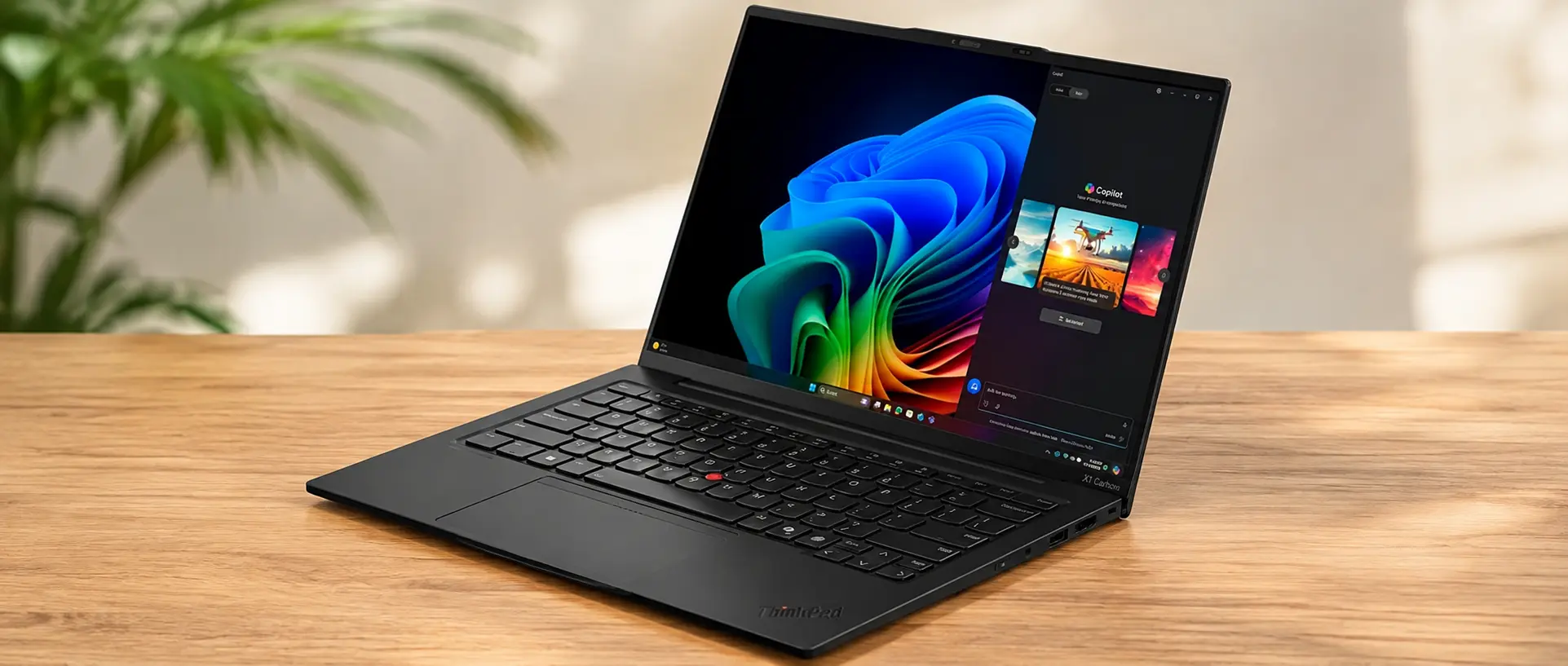
The ThinkPad X1 Carbon Gen 14 Aura Edition is the rare business refresh that actually changes the argument. Lenovo has produced a 996 g, 16.8 mm carbon-fibre ultraportable that runs for almost 24 hours of Wi-Fi web browsing on a 58 Wh pack, keeps three Thunderbolt 4 ports plus USB-A and HDMI 2.1, and scores 9/10 for repairability with a modular keyboard and modular USB-C ports. The compromises are equally clear: RAM is soldered and capped at 32 GB unless you step up to a Core Ultra X SKU, there is no discrete GPU, the panels ship badly calibrated, and at $2,139 to $2,800 you are paying flagship money for mid-tier silicon.
- Price:
- From $2,139
- Maker:
- Lenovo
Announced at CES in January 2026 and on sale from around July 2026. Core Ultra 5 325 configurations are commonly quoted at about $2,200; the Core Ultra 7 355 / 32 GB / 512 GB OLED units reviewed elsewhere landed at $2,217-$2,334, and a Core Ultra 7 356H / 32 GB / 1 TB build runs to roughly $2,800. Our European reference unit (21V70075GE) is EUR 2,469.
+Pros
- Lightest machine in its class at 996 g / 2.15 lb for the OLED model - credibly the most powerful sub-1 kg laptop yet shipped
- Battery life is the headline: almost 24 hours of Wi-Fi web surfing at 150 nits from a 58 Wh pack on the IPS model
- A repairability revolution for this segment - modular keyboard, modular USB-C ports and a 9/10 iFixit score
- Best-in-class input: 1.5 mm-travel ThinkPad keyboard, haptic touchpad and the TrackPoint, plus genuinely good 2x 2 W speakers
- Complete business port selection - 3x Thunderbolt 4, USB-A 3.2 Gen 1, HDMI 2.1, optional 5G WWAN with antennas pre-installed
- Redesigned cooling with 70% larger fans runs cooler and quieter than Gen 13 while sustaining clocks, peaking around 33 dB(A)
−Cons
- Expensive - $2,139 to start and $2,200-$2,800 as commonly reviewed, for mid-tier CPU configurations
- RAM is fully soldered and capped at 32 GB unless you buy a Core Ultra X SKU, and there is no dGPU option at all
- Performance is middling for the price: the Core Ultra 5 325 managed only 10,980 in Cinebench R23 multi, about 40% behind the HP OmniBook
- Poor out-of-box calibration - the IPS panel ships at DeltaE 5.0 ColorChecker and 8.3 greyscale
- The specification forks confusingly by display, the OLED trades away battery life, and the camera bump draws consistent complaints
01Price and availability
Lenovo announced the ThinkPad X1 Carbon Gen 14 Aura Edition at CES in January 2026, under the 21V7 and 21V8 machine types, and put it on sale around July 2026. US pricing starts at $2,139, with Core Ultra 5 325 configurations widely quoted at about $2,200 once you add the memory and storage most buyers actually want. Our European reference configuration, the 21V70075GE, is listed at EUR 2,469 with a Core Ultra 5 325, 32 GB of LPDDR5x and a 512 GB SSD behind the IPS touch panel.
The configurations that press units have been built around cluster tightly. Core Ultra 7 355 / 32 GB / 512 GB machines with the OLED panel came in between $2,217 and $2,334, while a Core Ultra 7 356H with 32 GB and a 1 TB drive runs to roughly $2,800. The Core Ultra X7 358H, which brings Arc B390 graphics with twelve Xe3 cores and unlocks 64 GB of LPDDR5x-9600, sits at the top of the stack and is the only route to either of those two things.
That is a lot of money, and every review of this machine says so - Tom's Hardware listed 'pricey' as the single con on an otherwise Editor's Choice verdict. What softens it is what comes attached: Windows 11 Pro, a 36-month warranty as standard, WWAN antennas already installed whether or not you order the modem, and a service model built around replaceable modules rather than a sealed brick. For a fleet buyer amortising over four or five years, the per-year arithmetic looks considerably better than the sticker does.
02Case, weight and the repairability story
The chassis measures 313.5 x 219.3 x 16.8 mm and, in OLED trim, weighs between 977 and 990 g - 2.15 lb, and light enough that picking it up for the first time is genuinely disorienting. The lid is carbon fibre; the base is magnesium on the OLED model and aluminium on the IPS touch model, which is the main reason the touch configuration lands at 1.139 kg instead. That 150 g fork is the single most consequential decision on the configurator, and Lenovo does very little to signpost it.
Rigidity is where a sub-kilogram machine usually gives itself away, and this one mostly does not. The lid resists twisting better than the weight suggests and the base has no meaningful flex under normal handling, although HotHardware noted minor give in the keyboard deck under deliberate pressure. The only consistent aesthetic complaint across every review is the camera bump housing the 5 MP webcam and IR sensor, which protrudes from the lid in a way that reads as a compromise rather than a design choice.
The headline, though, is serviceability. Lenovo built this generation around replaceable modules - the keyboard is a swap-in part rather than a riveted assembly, and the USB-C port boards are modular, which addresses the single most common failure mode on a laptop that lives in a bag. That combination earned a 9/10 iFixit repairability score, a figure essentially unheard of in a sub-1 kg ultraportable. The unavoidable asterisk is memory: LPDDR5x is soldered, and no amount of modular port boards changes that.
- Modular, replaceable keyboard assembly - not a riveted, glued-in part
- Modular USB-C port boards, so a damaged port is a component swap rather than a mainboard replacement
- 9/10 iFixit repairability score, exceptional for a sub-kilogram chassis
- M.2 2280 SSD in a slot Lenovo describes as serviceable rather than user-upgradable; wired as Gen 4, the slot supports Gen 5
- LPDDR5x memory is soldered - 16 or 32 GB, or 64 GB only on Core Ultra X SKUs
- 36-month warranty as standard, with WWAN antennas pre-installed even on non-modem units
03Keyboard, touchpad and connectivity
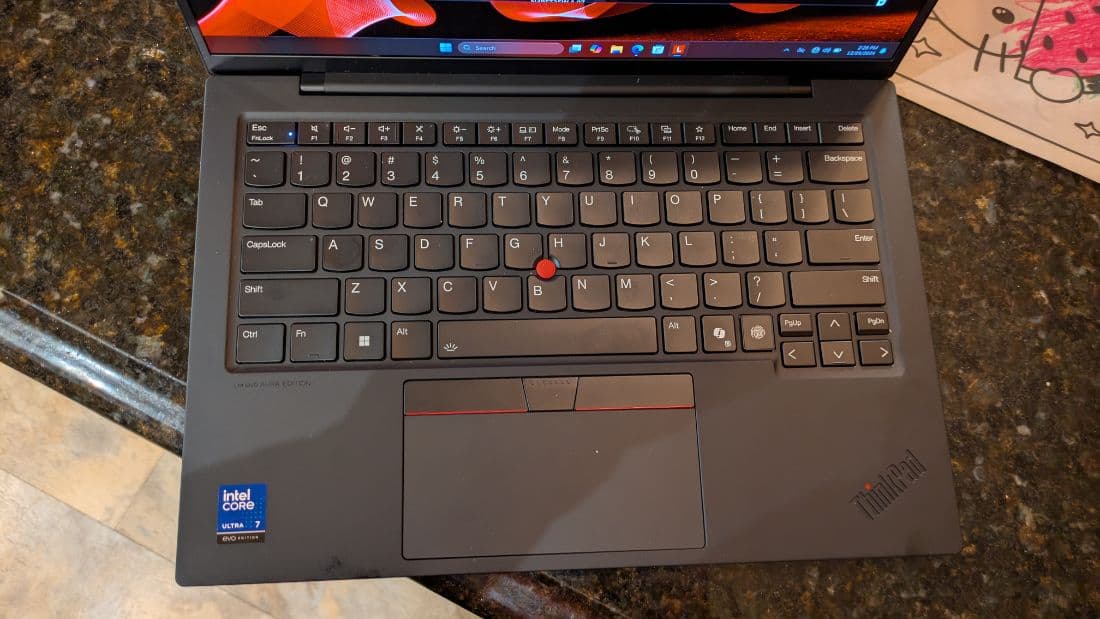
The keyboard remains the reason a certain kind of buyer will not consider anything else. Travel is 1.5 mm across the deck, reduced to 1.35 mm on the G, H and B keys to make room for the TrackPoint mechanism, and the action is the familiar firm, slightly damped ThinkPad feel with a clear bottom-out. The backlight is a two-stage affair that activates automatically, and unlike some rivals it does not bleed distractingly around the keycaps. In a 16.8 mm chassis this is a genuinely remarkable amount of key travel to have preserved.
Below it sits a haptic touchpad rather than a mechanical diving-board, which is the right call for a machine this thin: click force is uniform across the entire surface and the whole pad can be pressed without the dead zone at the top edge that plagues hinged designs. The TrackPoint is still there, still has its three physical buttons, and still divides opinion. Stereo speakers rated at 2 x 2 W were praised by every outlet that measured them - they are loud, clean at volume and far better than a chassis of this size has any right to produce.
Port selection is what separates this from consumer ultraportables at the same weight. You get three Thunderbolt 4 / USB-C ports at 40 Gbps with DisplayPort 2.1 and Power Delivery, a full-size USB-A 3.2 Gen 1, HDMI 2.1, a 3.5 mm combo jack, a Kensington Nano lock slot and an optional nano-SIM tray. Wireless is Intel Wi-Fi 7 BE211 with 320 MHz channels and Bluetooth 5.4, and our throughput testing returned 4,557 Mbps transmit and 3,244 Mbps receive - among the fastest results we have recorded on a business laptop.
Wi-Fi 7 throughput (BE211, 320 MHz)
Mbps — higher is betterSource: AURAVA Hardware Desk / Notebookcheck methodology
04Two very different 14-inch panels
Lenovo offers two 14.0-inch 16:10 panels, and they produce two genuinely different laptops. The first is a 1920x1200 IPS touchscreen at 60 Hz with a glossy finish, which measured 546 nits with a 1800:1 contrast ratio, 99.1% sRGB and 69.8% DCI-P3 coverage. The second is a 2880x1800 OLED at 120 Hz with variable refresh, a matte finish and DisplayHDR True Black 500 certification; Lenovo claims 500 nits in SDR, and independent measurement put it closer to 473 nits with 82% DCI-P3.
The IPS panel is the one to pick if outdoor legibility and runtime matter more than pixel density. 546 nits behind glossy glass is bright enough to work in daylight, contrast is high for an IPS, and we detected no PWM flicker at any brightness level - which matters for anyone sensitive to it, since the OLED alternative inevitably uses some form of duty-cycle dimming. The trade is the resolution, the 60 Hz ceiling and roughly 150 g of extra weight from the aluminium base that ships with this configuration.
Calibration is the weak point on both. Out of the box the IPS panel measured DeltaE 5.0 on the ColorChecker set and 8.3 on greyscale, which is poor for a machine at this price and visibly warm in practice. Profiling fixes it - we reached DeltaE 1.1 after calibration - but at a cost of roughly 100 nits of peak brightness, which is a real sacrifice on a laptop bought partly for outdoor use. If colour accuracy matters to your work, budget for a colorimeter and accept you will be working around 445 nits rather than 546.
05Panther Lake in a 35 W envelope
The CPU range spans the Core Ultra 5 325, Core Ultra 7 355, Core Ultra 7 356H and Core Ultra X7 358H, all Panther Lake. The Ultra 5 325 in our reference unit is an 8-core, 8-thread part (4P + 4E) peaking at 4.5 GHz; the Ultra 7 356H is a 16-core, 16-thread design (4P + 8E + 4LP) at 4.7 GHz. Lenovo configures the Ultra 5 at a 35 W PL1 that is also its sustained PL2, dropping to 25 W on battery - notably conservative against Intel's own 25 W base and 55 W turbo specification for the chip.
The results follow from that. The Ultra 5 325 unit produced 10,980 points in Cinebench R23 multi and 1,892 single, 645 and 113.3 in Cinebench 2024, 11,038 multi and 2,620 single in Geekbench 6, 7,709 in PCMark 10 and 36,228 MIPS in 7-Zip. Step up to the Core Ultra 7 356H and multi-thread output jumps to 18,151 in R23 with a 2,030 single-core result, PCMark 10 reaches 8,619, and 3DMark returns 3,426 in Time Spy, 6,601 in Fire Strike and 596 in Steel Nomad. That is the difference between adequate and competitive.
Storage is a Samsung PM9C1b in our unit - 512 GB, PCIe Gen 4 as shipped despite a slot that supports Gen 5. Sequential reads measured 5,129 MB/s in AS SSD and 6,900 MB/s in CrystalDiskMark, with writes of 3,282 and 5,762 MB/s respectively, and a sustained 25 GB file copy held 1,256 MB/s. Thermals are undramatic: the redesigned cooling with 70% larger fans keeps the keyboard around 35 C in daily use and roughly 50 C under load, with an underside measured at about 41 C, a keyboard at 34 C and a CPU package peaking at 91 C. Maximum fan noise is about 33 dB(A) in Performance mode.
Cinebench R23 multi-core
points — higher is betterSource: AURAVA Hardware Desk, Tom's Hardware, Ultrabookreview
06Battery life, charging and noise
This is the section that earns the score. From a 58 Wh (4,960 mAh) pack, the Core Ultra 5 325 with the IPS panel ran for almost 24 hours of Wi-Fi web surfing at 150 nits, and still managed around 14 hours with the display pinned at full brightness. Those are not typical ultraportable numbers; they are the kind of figures that change how you pack for a trip, because the 65 W USB-C charger and its 275 g power supply can credibly stay at home for a two-day trip.
The OLED configuration is a different machine on this metric. Testing on a Core Ultra 7 OLED unit returned 13 hours 10 minutes of web browsing, with mixed real-world use landing anywhere between 8 and 15 hours at 60% brightness on the Best Power Efficiency profile. That is still a good result in absolute terms and beats a Dell XPS 14, but it is roughly half the IPS model's best-case figure. If endurance is the reason you are looking at this laptop, the panel choice matters more than the processor choice.
Acoustics and surface temperatures are equally well judged. The redesigned cooling assembly with 70% larger fans tops out around 33 dB(A) in Performance mode, which is quiet enough to be inaudible in an office and a clear improvement over Gen 13. In light workloads the fans frequently stop entirely. Under sustained load the keyboard reaches roughly 50 C in its hottest spot and the underside about 41 C - warm on a lap, but never uncomfortable at a desk, and the palm rests stay cool because the exhaust is routed behind the hinge.
Battery runtime - Wi-Fi web browsing
hours — higher is betterSource: AURAVA Hardware Desk, Tom's Hardware
07How it compares
The HP OmniBook Ultra 14 is the obvious spoiler. With a Core Ultra X9 388H it returns 17,663 in Cinebench R23 multi and 7,094 in Time Spy - comfortably ahead of the ThinkPad in anything but the Core Ultra X7 configuration - and it can be found anywhere between roughly $1,700 and $2,800. What it does not do is weigh 996 g; at 1.281 kg it is nearly 30% heavier, and its 12-month warranty is a third of the ThinkPad's. It is the better laptop for compute per dollar and the worse one for a fleet.
The Dell XPS 14 undercuts both on price at $1,599 to $2,199 and brings a tandem OLED panel with a startling DeltaE of 0.20 - the calibration story the ThinkPad conspicuously lacks - but that panel peaks at only 355 nits, which is a problem in daylight. Its 12 hours 23 minutes of web browsing is respectable and roughly matches the ThinkPad's OLED configuration, but it is nowhere near the IPS model, and at 1.36 kg it is the heaviest machine in this group by some margin.
The Apple MacBook Air 13 with M5 is the value argument, starting near $999 with comparable endurance and a fanless chassis. What it cannot offer is any of the things that define this ThinkPad: there is no OLED option, no touchscreen, no WWAN, no user-serviceable anything, and nothing resembling a 9/10 repairability score or a three-year warranty. If your buying criteria are a spreadsheet of ports, service parts and warranty terms rather than benchmarks per dollar, the ThinkPad is still the only machine on this list that satisfies all of them.
Head to head
| Specification | ThinkPad X1 Carbon Gen 14 | HP OmniBook Ultra 14 (2026) | Dell XPS 14 (2026) | Apple MacBook Air 13 (M5) |
|---|---|---|---|---|
| Price | From $2,139 | ~$1,700-2,800 | $1,599-2,199 | From ~$999 |
| Processor (as tested) | Core Ultra 5 325 / Ultra 7 356H | Core Ultra X9 388H | Core Ultra X7 358H | Apple M5 |
| Weight | 0.977-1.139 kg | 1.281 kg | 1.36 kg | 1.24 kg |
| Cinebench R23 multi | 10,980 / 18,151 | 17,663 | Not measured | Not comparable |
| 3DMark Time Spy | 3,426 | 7,094 | Not measured | Not comparable |
| Battery (web browsing) | ~24 h IPS / 13 h 10 min OLED | Not measured | 12 h 23 min | Comparable endurance |
| Display highlight | 546 nits IPS, but DeltaE 5.0 factory | Not measured | Tandem OLED, DeltaE 0.20 but only 355 nits | No OLED and no touch option |
| Warranty / serviceability | 36 months, 9/10 iFixit, modular keyboard and ports | 12 months | 12 months | No ThinkPad-grade serviceability |
Full specifications
Processor, graphics and AI
| CPU options | Intel Core Ultra 5 325, Core Ultra 7 355, Core Ultra 7 356H, Core Ultra X7 358H (Panther Lake) |
|---|---|
| Core Ultra 5 325 | 8 cores / 8 threads (4P + 4E), up to 4.5 GHz |
| Core Ultra 7 356H | 16 cores / 16 threads (4P + 8E + 4LP), up to 4.7 GHz |
| Power limits (as configured) | 35 W PL1 = sustained PL2 on the Ultra 5 325; 25 W on battery (Intel spec: 25 W base / 55 W turbo) |
| Integrated graphics | Intel Graphics with 4 Xe3 cores at 2450 MHz on base SKUs |
| Arc B390 | 12 Xe3 cores, Core Ultra X7 358H only - no discrete GPU option exists |
| NPU | Intel NPU 5, 50 TOPS INT8 |
Memory and storage
| Memory | 16 or 32 GB LPDDR5x-7467, dual-channel - soldered |
|---|---|
| Maximum memory | 64 GB LPDDR5x-9600, Core Ultra X SKUs only |
| Storage | M.2 2280 SSD; Samsung PM9C1b 512 GB in our unit |
| Interface | PCIe Gen 4 as shipped; the slot supports Gen 5 |
| Serviceability | Lenovo lists the drive as serviceable rather than user-upgradable |
| Measured sequential read | 5,129 MB/s (AS SSD) / 6,900 MB/s (CrystalDiskMark) |
| Measured sequential write | 3,282 MB/s (AS SSD) / 5,762 MB/s (CrystalDiskMark) |
Display options
| IPS option | 14.0-inch 16:10, 1920x1200, 60 Hz, touch, glossy |
|---|---|
| IPS measured | 546 nits, 1800:1 contrast, 99.1% sRGB, 69.8% DCI-P3 |
| OLED option | 14.0-inch 16:10, 2880x1800, 120 Hz VRR, matte, DisplayHDR True Black 500 |
| OLED measured | 473 nits measured against a 500-nit SDR claim; 82% DCI-P3 |
| Factory calibration (IPS) | DeltaE 5.0 ColorChecker, 8.3 greyscale - DeltaE 1.1 after calibration, costing ~100 nits |
| PWM | No flicker detected on the IPS panel |
Connectivity and ports
| Thunderbolt | 3x Thunderbolt 4 / USB-C 40 Gbps with DisplayPort 2.1 and Power Delivery |
|---|---|
| USB-A | 1x USB-A 3.2 Gen 1 |
| Video and audio | HDMI 2.1, 3.5 mm combo jack |
| Other | Kensington Nano lock slot, optional nano-SIM tray |
| Wireless | Intel Wi-Fi 7 BE211 (320 MHz), Bluetooth 5.4 |
| Measured Wi-Fi | 4,557 Mbps transmit / 3,244 Mbps receive |
| WWAN | Optional 4G / 5G modem; antennas pre-installed on all units |
| Webcam | 5 MP with IR and a privacy shutter, in a protruding camera bump |
Chassis, battery and power
| Dimensions | 313.5 x 219.3 x 16.8 mm |
|---|---|
| Weight | 0.977-0.99 kg (2.15 lb) OLED; 1.139 kg IPS touch |
| Materials | Carbon-fibre lid; magnesium base (OLED) or aluminium base (IPS touch) |
| Keyboard | Backlit chiclet, 1.5 mm travel (1.35 mm on G/H/B), auto backlight, modular and replaceable |
| Pointing devices | Haptic touchpad plus TrackPoint |
| Speakers | Stereo, 2x 2 W |
| Battery and charger | 58 Wh (4,960 mAh); 65 W USB-C charger, 275 g PSU |
| OS and warranty | Windows 11 Pro; 36-month warranty |
Verdict
Judged as an engineering exercise, this is the best X1 Carbon Lenovo has shipped in at least five generations. The company took the two things that normally get sacrificed in a sub-kilogram chassis - runtime and serviceability - and refused to sacrifice either. A 58 Wh battery driving almost 24 hours of Wi-Fi web surfing at 150 nits is a number that would be respectable in a 15-inch machine and is close to absurd in a 977 g one. Pair that with a modular keyboard, modular USB-C port boards, a 9/10 iFixit repairability score and a 36-month warranty, and you have a laptop that a fleet manager can actually keep alive for five years.
Judged as a purchase, the picture is more conditional. The Core Ultra 5 325 unit we treat as our baseline turned in 10,980 points in Cinebench R23 multi, roughly 40% behind an HP OmniBook Ultra 14 that can be bought for less, and only the Core Ultra X7 358H with its Arc B390 graphics closes that gap. Nothing here has a discrete GPU, memory is soldered, and the specification forks awkwardly by panel: the IPS touch model is about 150 g heavier with an aluminium base, while the OLED model is lighter and sharper but gives back a large chunk of the runtime that is this laptop's headline feature.
Our 90 reflects a machine that is outstanding at what business buyers actually measure - endurance, input quality, port selection, repairability, acoustics - and merely adequate at what spec sheets measure. Buy the Core Ultra 5 or Ultra 7 IPS configuration if you want the record-breaking battery life and can calibrate the panel yourself. Buy the Core Ultra X7 358H if you need the graphics headroom and accept a shorter runtime. If you mainly want raw multi-thread throughput per dollar, this is the wrong laptop, and it has been the wrong laptop for that job for a decade.
Buy it if
- Mobile professionals who need a genuine full working day - or two - away from a socket
- IT departments that repair rather than replace, and want a 36-month warranty with modular parts
- Travellers who care about the difference between 1.0 kg and 1.3 kg in a bag every day
- Anyone who types for a living and still considers the ThinkPad keyboard and TrackPoint the benchmark
Skip it if
- You need more than 32 GB of memory - RAM is soldered and only Core Ultra X SKUs go to 64 GB
- Your workload is sustained multi-thread rendering or anything that wants a discrete GPU
- You want colour-accurate output straight out of the box without profiling the panel yourself
- You are price-sensitive - rivals deliver more compute per dollar, and the MacBook Air 13 starts near $999
Sources and further reading
- Notebookcheck - ThinkPad X1 Carbon Gen 14 review
- Tom's Hardware - X1 Carbon Gen 14 Aura Edition review
- HotHardware - X1 Carbon Gen 14 Aura Edition review
- Ultrabookreview - ThinkPad X1 Carbon Gen 14 review
- Lenovo PSREF - ThinkPad X1 Carbon Gen 14 Aura Edition
Figures quoted from third-party laboratories are attributed inline. Prices were correct at the time of publication and change often.